状态
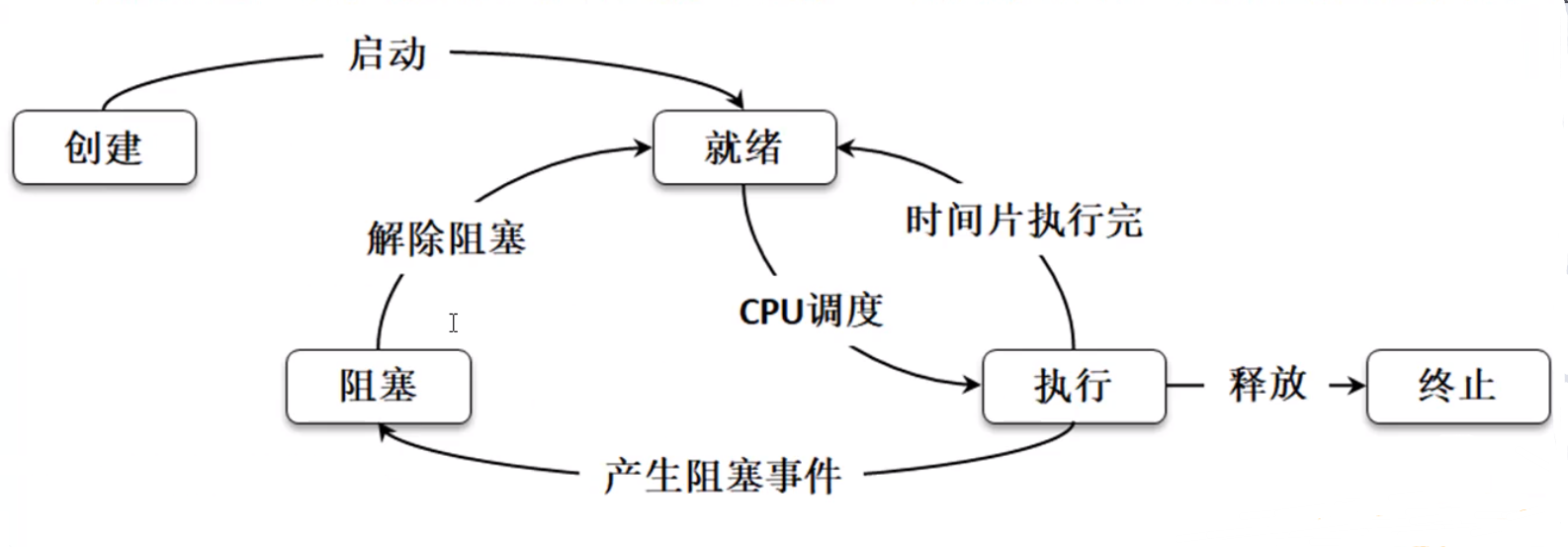
- 创建 - 开发者定义好了线程类的对象
- 就绪 - 调用 start() 方法
- 执行 - 在执行一段时间后暂停运行
- 阻塞 - 当某个线程不再执行时 (中断 , 休眠 , 调度失效) , 那么线程进入阻塞状态
- 终止 - 如果线程的执行体执行完成 , 就会进入终止状态
操作
线程的命名和取得
- 命名 Thread 类
| 方法 | 释义 |
|---|---|
| public Thread (Runnable target , String name) | 接受线程名 |
| public final void setName(String name) | 修改线程名 |
| public final void getName() | 获取线程名 |
- 取得
由于所有的线程状态都是不可控的 , 所以只能获取当前运行的线程名称
java
   Thread.currentThread().getName
即使我们没有给线程名称 , Thread也会给一个默认的名称
java
public Thread() {
    init(null, null, "Thread-" + nextThreadNum(), 0);
}
java
private static int threadInitNumber;
private static synchronized int nextThreadNum() {
    return threadInitNumber++;
}
线程休眠
默认情况下线程对象只要启动了 , 就会持续运行下去 , 一直到运行完毕为止 , 如何使运行缓慢一些 , 那么就可以使用休眠 , 在 Thread类里面提供有休眠的方法:
| 方法 | 释义 |
|---|---|
| public static void sleep(long millis) throws InterruptedException; | 毫秒 |
| public static void sleep(long millis, int nanos) throws InterruptedException; | 毫秒和纳秒 |
线程中断
| 方法 | 释义 |
|---|---|
| public void interrupt() | 线程中断 |
| public boolean isIntrrupted() | 判断线程中断状态 |
一个线程被另一个线程打断
范例 :
Thread thread = new Thread(() -> {
    try {
        Thread.sleep(2000);
        System.out.println("吃饱睡足,开始学习---");
    } catch (InterruptedException e) {
        System.out.println("被打扰,抓狂");
    }
});
thread.start();
System.out.println("线程中断状态" + thread.isInterrupted());
Thread.sleep(1000);
thread.interrupt();
System.out.println("线程中断状态" + thread.isInterrupted());
线程强制执行
当程序中存在若干个线程的时候 , 那么这若干个线程之间彼此肯定是相互交替执行的状态 , 但是有一个线程特别急 , 需要优先处理完成 , 则可以使用线程的强制执行
| 方法 | 释义 |
|---|---|
| public final void join() | 线程强制执行 |
| public final void join(long millis) | 线程强制执行 毫秒 |
| public final void join(long millis, int nanos) | 线程强制执行 毫秒 和 纳秒 |
范例 :
public class Main {

    public static void main(String[] args) throws Exception {
        Thread mainThread = Thread.currentThread();
        Thread thread = new Thread(() -> {
            for (int i = 0; i < 1000; i++) {
                if (i==10) {
                    try {
                        i=11;
                        mainThread.join(); // 主线程执行
                    } catch (InterruptedException e) {
                        e.printStackTrace();
                    }
                }
                System.out.println(Thread.currentThread().getName() + "执行,x=" + i);
            }
        },"循环线程");
        thread.start();
        for (int i = 0; i < 50; i++) {
            Thread.sleep(100);
            System.out.println(Thread.currentThread().getName() + "执行,x=" + i);
        }
    }
}
使用
join()会将线程强制执行 , 如果没有指定时间 , 那就会等待线程结束后进行运行
线程礼让
| 方法 | 释义 |
|---|---|
| public static void yield() | 线程礼让 |
范例 :
Thread thread = new Thread(() -> {
    for (int i = 0; i < 1000; i++) {
        if (i%3==0){
            Thread.yield();
            System.out.println("[yield]");
        }
        try {
            Thread.sleep(1000);
        } catch (InterruptedException e) {
            e.printStackTrace();
        }
        System.out.println(Thread.currentThread().getName() + "执行,x=" + i);
    }
},"循环线程");
thread.start();
for (int i = 0; i < 50; i++) {
    Thread.sleep(1000);
    System.out.println(Thread.currentThread().getName() + "执行,x=" + i);
}
礼让会优先使别的线程运行==一次== , 而后会继续抢占资源
线程优先级
理论上线程的优先级越高 , 越有可能先执行
| 方法及常量 | 释义 |
|---|---|
| public final void setPriority(int newPriority) | 设置优先级 |
| public final int getPriority() | 获取优先级 |
| public static final int MIN_PRIORITY | 最低优先级(数值为"1") |
| public static final int NORM_PRIORITY | 中等优先级(数值为"5") |
| public static final int MAX_PRIORITY | 最高优先级(数值为"10") |
范例 :
Runnable runnable = () -> {
    for (int i = 0; i < 100; i++) {
        try {
            Thread.sleep(100);
        } catch (InterruptedException e) {
            e.printStackTrace();
        }
        System.out.println(Thread.currentThread().getName() + "[" + i + "]");
    }
};
Thread threadA = new Thread(runnable,"A");
Thread threadB = new Thread(runnable,"B");
Thread threadC = new Thread(runnable,"C");
threadA.setPriority(Thread.MAX_PRIORITY);
threadA.setPriority(Thread.MIN_PRIORITY);
threadA.setPriority(Thread.MIN_PRIORITY);
threadA.start();
threadB.start();
threadC.start();
线程的默认优先级为 NORM_PRIORITY = 5;
线程的同步与死锁
多个线程并发访问时可能会造成不同步
不同步分析
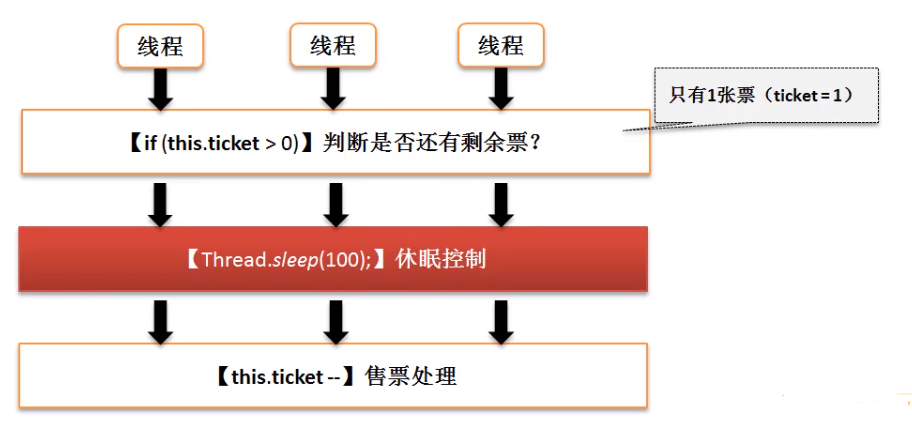
class TicketThread implements Runnable {
    private int ticket = 6;

    @Override
    public void run() {
        for (int i = 0; i < 10; i++) {
            if (ticket > 0) {
                ticket--;
                try {
                    Thread.sleep(2000);
                } catch (InterruptedException e) {
                    e.printStackTrace();
                }
                System.out.println("卖出一张票 , 还剩" + ticket + "张票");
            }
        }
    }
}
public class Main {
    public static void main(String[] args) throws Exception {
        TicketThread ticketThread = new TicketThread();
        Thread thread1 = new Thread(ticketThread);
        Thread thread2 = new Thread(ticketThread);
        Thread thread3 = new Thread(ticketThread);
        thread1.start();
        thread2.start();
        thread3.start();
    }
}
多个线程进入到程序中 , 并行执行
同步
如果想解决不同步的问题 , 就必须使用同步 , 所谓的同步就是指多个操作在同一个时间段内只能有一个线程进行 , 其他线程要等待此线程完成后才可以继续执行 .
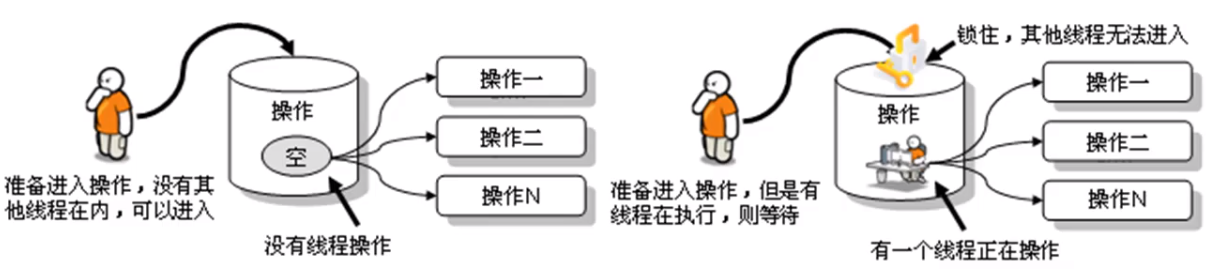
如果想要实现线程同步处理 , 可以利用==synchronized== 关键字来实现 , 对于synchronize的使用有两种方法 :
- 同步代码块
使用==synchronized== 关键字定义的代码块 , 在进行同步的时候一定要有一个同步的对象 , 这个对象往往为当前资源的对象 , 可以使用this描述
java
   synchronized (同步对象){
    所有需要同步处理的操作代码;
   }
范例 : 售票同步
```java class TicketThread implements Runnable { private int ticket = 6;
   @Override
   public void run() {
       for (int i = 0; i < 10; i++) {
           synchronized (this) { // 添加同步代码块
               if (ticket > 0) {
                   ticket--;
                   try {
                       Thread.sleep(2000);
                   } catch (InterruptedException e) {
                       e.printStackTrace();
                   }
                   System.out.println("卖出一张票 , 还剩" + ticket + "张票");
               }
           }
       }
   }
} ```
- 同步方法
java
   synchronized 返回值 方法名(){
       //  方法体
   }
范例 :
```java class TicketThread implements Runnable { private int ticket = 6;
   @Override
   public void run() {
       for (int i = 0; i < 10; i++) {
           this.buy();
       }
   }

   synchronized void buy() {
       if (ticket > 0) {
           ticket--;
           try {
               Thread.sleep(2000);
           } catch (InterruptedException e) {
               e.printStackTrace();
           }
           System.out.println("卖出一张票 , 还剩" + ticket + "张票");
       }
   }
} ```
死锁
死锁就是线程互相等待